The app ships with a catalogue of factory loads covering pistol, rifle, magnum and hunting calibres. Selecting one fills in the ballistic coefficient, the drag model, the bullet weight and a nominal muzzle velocity in a single tap.
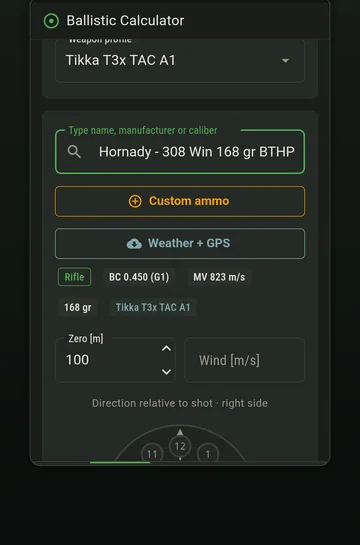
Finding your ammunition
Search by manufacturer, calibre, bullet name or weight. Most people find their load fastest by typing the calibre and then scanning weights — there are usually only a handful of match offerings per calibre.
If you want to browse before you are at the range, the same data is published as a web reference with one page per load, including sectional density and form factor alongside the coefficients.
Which numbers to trust
| Field | Trust level | What to do |
|---|---|---|
| Bullet weight | High | Accept it |
| Calibre | High | Accept it |
| Ballistic coefficient | Moderate | Start here, true it later |
| Drag model | High | Accept it; it is matched to the coefficient |
| Muzzle velocity | Low for your rifle | Replace with your own as soon as you can |
That last row is the important one. A catalogue velocity comes from the manufacturer's test barrel, which is not your barrel. Differences of 40–60 fps between two rifles of the same model firing the same box are routine, and velocity is the input the solver is most sensitive to.
G1 or G7?
Loads that publish both carry both, with the manufacturer's preferred model marked. For modern boat-tail match bullets that is normally G7, and the G7 figure is the more stable of the two across velocities.
The one rule that matters: the coefficient and the model must match. A G1 number running against the G7 table models a bullet with roughly double the real drag, and the error is invisible at 100 m and decisive at 800. The full explanation is in G1 vs G7.
Entering a handload
Use the Handloads screen for anything the catalogue does not carry — your own recipes, a load from a manufacturer not covered, or a factory load whose numbers you have replaced wholesale.
- Name it so you will recognise it in a yearBullet, weight, powder charge. 'Test load 3' is a name you will regret.
- Enter the bullet's ballistic coefficient and modelFrom the bullet manufacturer, not the ammunition manufacturer. You are loading their bullet.
- Enter your measured muzzle velocityWith the temperature you measured it at, if you are also entering a powder temperature coefficient.
- Enter bullet weight and calibreThese feed energy, sectional density and the stability factor used for spin drift.
- Save and set it as the profile default if it is your main loadHandloads appear in the same pickers as catalogue loads throughout the app.
Two loads, one rifle
A match load and a hunting load in the same rifle have different velocities and usually different zeros. The cleanest arrangement is two rifle profiles, each with its own zero and default load, rather than one profile whose load you swap and whose zero you then have to remember to change.
Keeping a load honest over time
- A new lot is a new load. Powder lots differ. Re-chronograph rather than assuming continuity.
- Barrels erode. Velocity drifts over a barrel's life, usually downward at first as the throat settles and then upward as it wears. Re-measure each season.
- Record the temperature. A velocity without one cannot be corrected for a different day.
- True the coefficient, not the velocity, at long range. The order matters — see truing.
Frequently asked
My exact load is not in the database. What now? +
Create it under Handloads with the bullet manufacturer's coefficient and your own velocity. That entry is better than any catalogue match, because both numbers describe what you actually shoot.
Can I edit a catalogue load? +
Change the muzzle velocity for your rifle, yes — that is expected. If you find yourself changing several fields, create a handload entry instead so the original stays intact as a reference.
Do handloads show up everywhere in the app? +
Yes. They appear alongside catalogue loads in every picker — the calculator, the profile default, the training session and the truing screen.