The training journal exists because memory is a poor instrument. Shooters remember their best group and their worst miss, and almost nothing in between — which is exactly the material a trend is made of.
Three disciplines, three sets of numbers
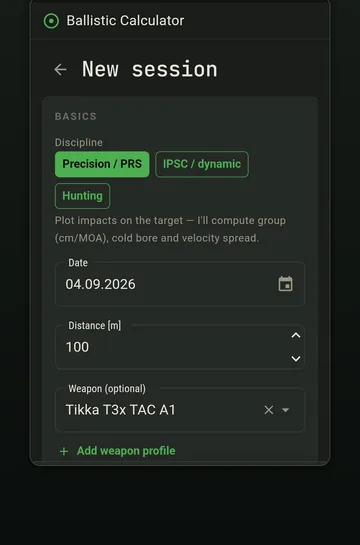
When you start a session you choose a discipline, and that choice decides what the app asks for and what it computes.
| Discipline | You record | It computes |
|---|---|---|
| Precision / PRS | Hits plotted on a target | Group size in cm and MOA, cold bore, velocity spread |
| IPSC / dynamic | Stage time and hit zones (A/C/D/M) | Points and hit factor |
| Hunting | Distance and outcome per shot | Bullet energy at that distance |
The weapon is optional. A session with no rifle attached still saves, which matters more than it sounds — the commonest reason people abandon a log is a form that refuses to accept a partial record.
Precision sessions
Plot each hit on the target and the app measures the group for you, in centimetres and in angular units at the distance you shot. Several target presets are available — ISSF 25/50 m, a gong of a size you specify, a fine measuring grid, or a free X/Y plot when none of those fit.
The first shot of a session is treated as the cold bore shot, which is what makes the cold bore drill possible without separate bookkeeping. Over a season the pattern of first shots against group centres is either a real offset or it is not, and you will be able to tell.
Dynamic sessions
Enter the stage time and tap the zone for each shot. Scoring is minor power factor — A = 5, C = 3, D = 1, a miss = 0 — and hit factor is total points divided by stage time.
The value shows up when you run the same array at different paces and compare — see the hit factor drill.
Hunting sessions
Distance and result per shot, with the retained energy at that distance computed from the load. It is the simplest of the three and the one most likely to be filled in afterwards, from the truck, which is fine — a record made an hour later beats no record.
What to record beyond the shots
- Conditions. Temperature and pressure make a session comparable to another one months later.
- Ammunition lot. A group that changed when the lot changed is a finding, not a mystery.
- Position. Prone, barricade, tripod. Group size means something different from each.
- Your wind call and the actual result, if you are working on wind. That pairing is the whole wind calling drill.
- What you were working on. A one-line note is worth more in six months than the numbers alone.
Reading the trend
The dashboard summarises across sessions: shot counts, session counts, last group, and filters by rifle and by mode. That filtering is what makes the numbers honest — comparing a barricade group against a prone group tells you nothing except that barricades are harder.
- Filter to one rifle and one modeOtherwise you are averaging incomparable things.
- Look at the trend, not the last sessionOne good group is luck. A downward trend across ten is a skill change.
- Look for the outliers and find their causeA session that is far off the trend usually has an explanation in the notes — new lot, high wind, a position you rarely shoot.
- Compare cold bore against group centre over timeThis is the one pattern that is invisible without a log and genuinely useful on a hunt.
Where the data lives
In the app's own storage on the phone. There is no account and no sync, so nothing leaves the device unless you export it or Android's backup copies it to your Google Drive. That also means a reinstall without backup enabled loses it — worth knowing before you accumulate two seasons.
Frequently asked
Can I save a session with no shots? +
Yes. A session record with conditions and notes but no plotted shots still saves. A log you can only use when you have complete data is a log you stop using.
Do I have to attach a rifle profile? +
No, it is optional. Attaching one makes the session comparable to others with the same rifle, which is where the value is, but a quick entry without it is better than nothing.
Is my training data backed up anywhere? +
Only by Android's own backup to your Google Drive, if you have that enabled. There is no account and no cloud sync in the app.